FleetML
Ship ML models to phones and edge devices in stages, watch how each version behaves, and roll back automatically when one is worse.
Get started
Ten minutes, copy and paste, nothing to choose. Each step says what you should see; if you see something else, stop there and look it up in Troubleshooting. Use one terminal (bash or zsh, on macOS or Linux; on Windows, see On Windows) and keep it open until the end.
-
Check the tools. You need Docker (Docker Desktop on a Mac), git, curl and jq (installing them):
docker compose version && git --version && jq --versionYou should see
Docker Compose version(v2 or later) andjq-on the last line. -
Start FleetML. The first start takes a few minutes, to download and build the images. This block clones the repository if you are not already in it, writes the server's secrets to
~/.fleetml.envonce, starts the stack and waits until it answers:[ -f deploy/docker-compose.prod.yml ] || { [ -d fleetml ] || git clone https://github.com/fleetml/fleetml.git; cd fleetml; } [ -f ~/.fleetml.env ] || (umask 077; printf "export JWT_SECRET='%s' SIGNING_MASTER_KEY='%s' FLEETML_ADMIN_KEY='%s' FLEETML_REST_PORT=%s FLEETML_GRPC_PORT=%s FLEETML_DASHBOARD_PORT=%s FLEETML_S3_PUBLIC_PORT=%s S3_PUBLIC_ENDPOINT=localhost:%s\n" "$(openssl rand -base64 32)" "$(openssl rand -base64 32)" "$(openssl rand -hex 32)" "${FLEETML_REST_PORT:-18080}" "${FLEETML_GRPC_PORT:-19090}" "${FLEETML_DASHBOARD_PORT:-80}" "${FLEETML_S3_PUBLIC_PORT:-19100}" "${FLEETML_S3_PUBLIC_PORT:-19100}" > ~/.fleetml.env) source ~/.fleetml.env docker compose -f deploy/docker-compose.prod.yml up -d --build && for i in $(seq 90); do curl -sf localhost:${FLEETML_REST_PORT:-18080}/readyz && break; [ $i = 90 ] && echo "Not ready after 3 minutes: see Troubleshooting in docs/ADVANCED.md"; sleep 2; done || echo "Start failed: see Troubleshooting in docs/ADVANCED.md"; echo curl -sf -H "Authorization: Bearer $FLEETML_ADMIN_KEY" localhost:${FLEETML_REST_PORT:-18080}/api/v1/projects && echo && echo "Dashboard: http://localhost:${FLEETML_DASHBOARD_PORT:-80} (log in with FLEETML_ADMIN_KEY from ~/.fleetml.env)"You should see
{"db":"connected","nats":"connected","s3":"connected","status":"ok","version":"<version>"}. The block saved the server's secrets in~/.fleetml.env: keep that file. -
Get the CLI, checked against the release's checksums:
OS=$(uname -s | tr '[:upper:]' '[:lower:]'); ARCH=$(uname -m | sed -e 's/x86_64/amd64/' -e 's/aarch64/arm64/')
curl -fsSLO "https://github.com/fleetml/fleetml/releases/latest/download/fleetml-$OS-$ARCH.tar.gz"
curl -fsSLO https://github.com/fleetml/fleetml/releases/latest/download/SHA256SUMS
grep " fleetml-$OS-$ARCH.tar.gz\$" SHA256SUMS | shasum -a 256 -c
mkdir -p ~/.local/bin && tar -xzf "fleetml-$OS-$ARCH.tar.gz" -C ~/.local/bin fleetml
rm "fleetml-$OS-$ARCH.tar.gz" SHA256SUMS
export PATH="$HOME/.local/bin:$PATH"
fleetml version
You should see
fleetml-<os>-<arch>.tar.gz: OKand✓ fleetml v<version>. -
Publish the sample model and deploy it. The project gets the time in its name, so running the block again makes a new one:
export FLEETML_SERVER=http://localhost:${FLEETML_REST_PORT:-18080} FLEETML_API_KEY=$FLEETML_ADMIN_KEY
P=$(fleetml project create --name "first-$(date +%H%M%S)" -o json | jq -r .id)
fleetml push models/iris/iris_v1.tflite --project $P --model iris --version 1.0.0
V=$(fleetml ver list --model "$(fleetml model list --project $P -o json | jq -r '.[0].id')" -o json | jq -r '.[0].id')
fleetml deploy start "$(fleetml deploy create --project $P --version $V -o json | jq -r .id)"
export FLEETML_ENROLLMENT_KEY=$(fleetml enrollment-key create --project $P --name first-device -o json | jq -r .key)
You should see
✓ Pushed models/iris/iris_v1.tflite → iris v1.0.0 (INT8)and✓ Deployment start → COMPLETE. -
Put a device on it: the Linux device agent, which registers with the enrollment key from step 4, downloads the model, checks it and makes it active. This block downloads the agent, runs it in an Ubuntu container as an unprivileged user and waits until it reports the model active:
ARCH=$(uname -m | sed -e 's/x86_64/amd64/' -e 's/aarch64/arm64/')
mkdir -p fleetml-agent && curl -fsSL "https://github.com/fleetml/fleetml/releases/latest/download/fleetml-agent-linux-$ARCH.tar.gz" | tar -xz -C fleetml-agent
docker run -d --init --name fleetml-agent --add-host=host.docker.internal:host-gateway -e FLEETML_ENROLLMENT_KEY \
  -v "$PWD/fleetml-agent:/opt/fleetml-agent:ro" ubuntu:24.04 sh -c "/opt/fleetml-agent/install.sh /opt/fleetml-agent/fleetml-agent > /dev/null &&
  exec setpriv --reuid=fleetml-agent --regid=fleetml-agent --init-groups /usr/local/bin/fleetml-agent -config /etc/fleetml-agent/config.yaml \
    -server host.docker.internal:${FLEETML_GRPC_PORT:-19090} -download-host-override host.docker.internal:${FLEETML_S3_PUBLIC_PORT:-19100}"
for i in $(seq 60); do docker logs fleetml-agent 2>&1 | grep 'model active' && break; [ $i = 60 ] && echo "No model active after 2 minutes: see Troubleshooting"; sleep 2; done
You should see
msg="model active" model=iris version=1.0.0. On a phone instead: the Android guide (a phone on a USB cable) or the iOS guide (the simulator, then an iPhone). -
See it in the dashboard. This puts the admin key on the clipboard (on a Mac, in WSL, or on Linux with
xclip; elsewhere it prints it) and prints the dashboard's address: open it and paste the key into the login box:printf %s "$FLEETML_ADMIN_KEY" | { pbcopy || clip.exe || xclip -selection clipboard || cat; } 2> /dev/null; echo echo "Dashboard: http://localhost:${FLEETML_DASHBOARD_PORT:-80}"You should see
Dashboard: http://localhost:<port>, and in the browser the Overview page (Dashboard in the menu); Devices lists one device, and Deployments oneCOMPLETEdeployment of iris 1.0.0.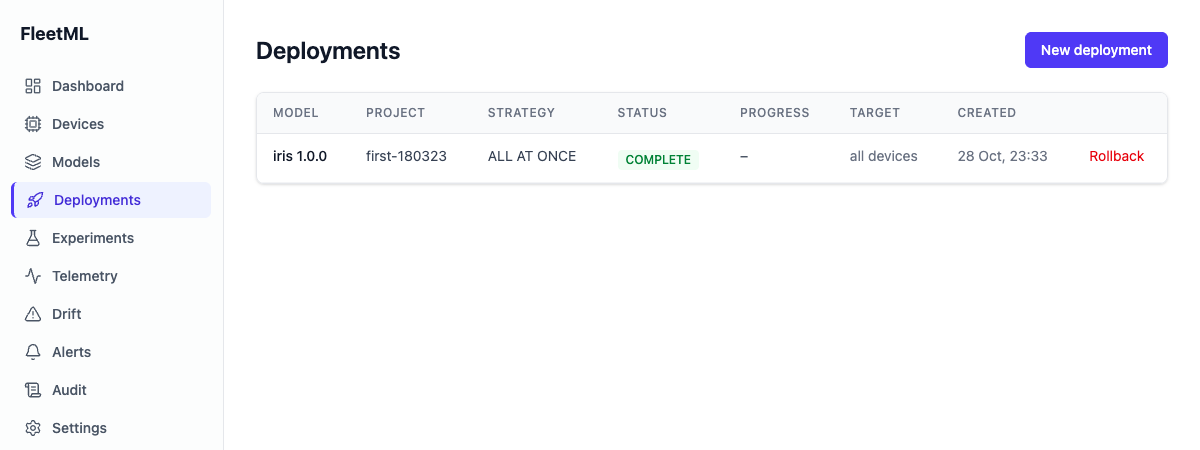
-
Clean up, when you are done (after the tour, if you take it: this also stops its simulator and Grafana): the device, the server and all its data, and the saved secrets (the CLI stays in
~/.local/bin;downwithout-vwould keep the data):kill $SIM 2>/dev/null; docker rm -f fleetml-agent 2>/dev/null source ~/.fleetml.env && docker compose -f deploy/docker-compose.prod.yml --profile observability down -v && rm -rf fleetml-agent ~/.fleetml.env /tmp/fleetml-sim.logYou should see
Network <stack>_default Removed.
Next: the tour (canary rollouts that roll
themselves back, A/B tests, drift) against twenty simulated devices, on a
running stack (before step 7, or after step 2 again; step 2 reuses the
clone); your own
Android or iOS app; a real
Linux machine; Python;
Kubernetes; upgrading a
stack you keep; developing FleetML itself, CONTRIBUTING.md
(make dev runs the server from source). Other ports, a phone over Wi-Fi and
everything else that is a choice: docs/ADVANCED.md.
Why
Getting a model file onto phones and edge devices is the easy part. Taking a bad version back from the devices that already have it, before every device has it, is not, so teams that run models on devices end up building staged rollouts, rollback and drift monitoring themselves.
The hosted options are going away: Firebase ML, including its custom model hosting, is deprecated and shuts down on June 15, 2027 (Firebase docs), and SageMaker Edge Manager was discontinued in 2024 (AWS docs).
FleetML is self-hosted and Apache-2.0, and works with any model file. Devices verify each download and keep the previous version if the new one does not load. Your app runs the model with its own runtime.
What FleetML is not. It is not an inference runtime: your app or inference process keeps running the model with the runtime you already use, so nothing about inference changes. It is not a model trainer or converter: it starts from a file you already have, in any format. And it is not a hosted service: you run the server, its Postgres, NATS and object store yourself, with Docker Compose or the Helm chart, so your models and telemetry never leave your infrastructure.
The 60-second story
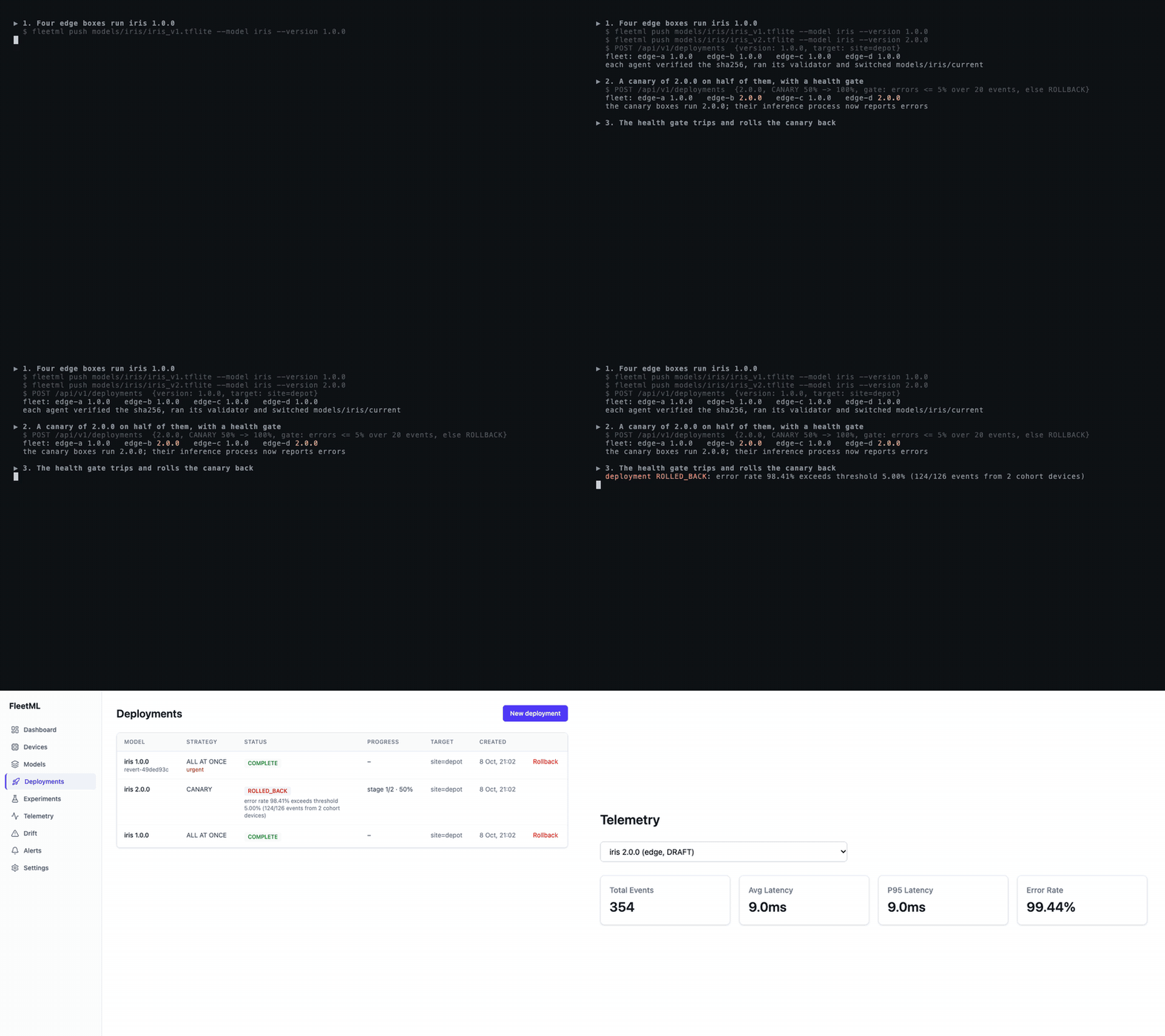
Above, scripts/demo-agent.sh: four
Linux device agents run iris 1.0.0, a canary of 2.0.0
reaches some of them, their inference process reports errors, the health gate
rolls the release back, and the canary boxes switch back to 1.0.0 without a
download (under a minute, most of it the setup; then the dashboard). The GIF is regenerated by
docs/screenshots/demo/record.sh.
scripts/demo.sh tells the longer story against a real
server and twenty simulated devices that use the same protocol as the SDKs
(needs Docker, Go and jq; 55 seconds with the images and Go modules cached,
a few minutes more on a first run, which pulls and downloads them):
▶ 1. Publish three versions of a model
  ✓ Pushed models/iris/iris_v1.tflite → iris v1.0.0 (INT8)          (2.0.0 and 2.1.0 too)
▶ 2. Twenty devices enroll and get 1.0.0
  fleet: iris 1.0.0 on 20
▶ 3. Drift: the last day's latency against the week before
  latency drift for 1.0.0: NONE (PSI 0.044)
  now the devices slow down (say, after an OS update)...
  latency drift for 1.0.0: CRITICAL (PSI 8.511)
  a change into CRITICAL is sent as an alert: 1 drift alert(s) on NATS
▶ 4. A canary of 2.0.0 with a health gate; 2.0.0 is broken
  fleet: iris 1.0.0 on 11, iris 2.0.0 on 9   (the canary cohort only)
  deployment ROLLED_BACK: error rate 32.18% exceeds threshold 5.00% (56/174 events from 9 cohort devices)
  fleet: iris 1.0.0 on 20, nobody outside the canary ever saw 2.0.0
▶ 5. A/B test: 1.0.0 against the fixed 2.1.0
  control 1.0.0:   450 inferences, mean 34 ms
  treatment 2.1.0: 450 inferences, mean 14 ms
  Welch t-test p < 0.0001, recommendation: ADOPT_TREATMENT
  fleet: iris 2.1.0 on 20
It leaves the dev stack it starts running (compose project fleetml, ports
15432, 19000 and 14222): docker compose -f deploy/docker-compose.yml down -v
removes it and its data.
Features
The end-to-end tests in test/e2e cover every row; make e2e runs them.
| Feature | See it |
|---|---|
| Model registry with integrity checks. Uploads go straight to S3-compatible storage, and the server checks each file's sha256 and size before it can be deployed. | Tour step 1 |
| Variant selection. Each device gets a build it can run, chosen by OS runtime, RAM and capability score. | Tour step 2, ROLLOUTS.md |
| Canary rollouts with a health gate. The gate watches the canary cohort's error rate, and optionally p95 latency, and rolls back or pauses. | Tour step 3 |
| Rolling rollouts. Batches by device count or percentage at an interval, with the same gate. | ROLLOUTS.md |
| Rollback, cancel, one version per model. A manual rollback, also after completion, returns devices to the previous version, and the newest deployment wins. | ROLLOUTS.md |
| A/B experiments. Sticky cohorts, telemetry per arm, a fixed-horizon Welch t-test and a maximum duration. | Tour step 4 |
| Drift detection. PSI on latency, confidence and input features, the last 24 hours against the 7 days before, with an alert on CRITICAL. | Tour step 5 |
| Alerts. Rollback and drift alerts on NATS and to signed webhooks, Slack and email, with retries and a delivery log. | ROLLOUTS.md |
| Android SDK. A Kotlin SDK (minSdk 26) with resumable verified downloads, validation, last-known-good, offline start and persistent telemetry, tested on the emulator and a physical phone. | ANDROID_SDK.md |
| iOS SDK. A Swift package (iOS 15 and later) with Core ML validation and Keychain credentials, tested on simulators and a physical phone. | IOS_SDK.md |
| Linux device agent. A static binary (amd64, arm64) and systemd service with the same rollout, validation and last-known-good rules. | LINUX_AGENT.md |
| Battery and data. Hourly background checks, batched telemetry, and downloads on unmetered networks or while charging unless urgent, all set from the server. | Android, iOS |
| Dashboard. Models, deployments, experiments, drift and alert sinks, with server-side login sessions, on a desktop or a phone. | Tour step 6, screenshots |
CLI. fleetml push, deploy, experiment, drift, and simulate for a fleet of simulated devices. |
Tour |
| Security. API keys with per-project roles, per-project enrollment keys, revocable device tokens, and devices confined to their project. | SECURITY.md |
| Operations. Health probes, Prometheus metrics and a Grafana dashboard, with telemetry delivered at least once and stored once per event ID. | Tour step 7 |
| Roles and audit log. Viewer, operator and admin roles per project, and an audit log of every change and refused request. | ARCHITECTURE.md |
| Helm chart. The server, the dashboard and optional bundled Postgres, NATS and SeaweedFS, tested end to end in kind. | deploy/helm/fleetml |
| Delta updates. Devices with the previous version download only a delta: 440 KB for a 20 MB model with a retrained head. | ROLLOUTS.md |
| Artifact signing. Per-project ed25519 signatures, checked on the device before download, with keys that rotate with a grace period. | ROLLOUTS.md |
Install the SDKs
Android, from Maven Central (with mavenCentral() in the app's repositories;
the app needs compileSdk 34 or later and minSdk 26,
details):
implementation("dev.fleetml:fleetml-sdk:0.10.7")
implementation("org.tensorflow:tensorflow-lite:2.17.0") // if you run TFLite models
iOS, in Xcode with File → Add Package Dependencies and the repository URL (Dependency Rule Up to Next Major Version from 0.10.7; details):
https://github.com/fleetml/fleetml
Python, for pipelines and notebooks: pip install fleetml
(Python client):
import time
from fleetml import FleetML
fm = FleetML()  # the server and key from FLEETML_SERVER and FLEETML_API_KEY
p = fm.projects.create(f"pipeline-{time.strftime('%Y%m%d-%H%M%S')}")  # names are unique per server
v = fm.push("models/iris/iris_v1.tflite", project=p.id, model="iris", version="1.0.0")
fm.deployments.start(fm.deployments.create(p.id, v.id).id)
From the root of the clone (the sample model is there; your own file
otherwise). Each run makes a new project, since a project name and a
model's version number can each be used once: in a project of yours, push
the next version instead (1.0.1).
How it works
Android / iOS SDK ──── gRPC ────▶ FleetML server ──▶ Postgres + TimescaleDB
Dashboard, CLI ─────── REST ────▶  (Go)           ──▶ NATS (telemetry, alerts)
        └──────── presigned URLs ─────────────────────▶ S3-compatible object store
Devices heartbeat with the models they run and receive assignments: what to load, update or unload, with presigned download URLs and their experiment arms. Three background loops advance rollouts through the health gate, evaluate experiments and check drift. docs/ARCHITECTURE.md has the request paths, data model, device protocol and trust boundaries.
| Credential | Who uses it | Manage |
|---|---|---|
| API key | CLI and scripts (Authorization: Bearer); the dashboard logs in with one. Each key acts as a user with a role per project (viewer, operator, admin) or as a global admin |
CONFIG.md |
| Dashboard session | One browser after logging in (httpOnly cookie, 12 hours) |
GET /api/v1/auth/sessions, POST .../{id}/revoke |
| Enrollment key | An app's first device registration, per project | fleetml enrollment-key create, list, revoke; POST /api/v1/enrollment-keys/{id}/rotate |
| Device token | Every device call after registering (30 days, refreshed by the SDK) | POST /api/v1/devices/{id}/revoke |
Configuration
The server is configured with environment variables; docs/CONFIG.md lists every one, for the server, Docker Compose, the CLI, the dashboard and the test scripts. The essentials:
| Variable | Default | Description |
|---|---|---|
DATABASE_URL |
(required) | Postgres/TimescaleDB connection string |
S3_ACCESS_KEY, S3_SECRET_KEY |
(required) | Object store credentials; S3_ENDPOINT defaults to localhost:19000 |
S3_PUBLIC_ENDPOINT |
(unset) | Where devices and the CLI reach the object store, if not S3_ENDPOINT |
JWT_SECRET |
(required) | Signs device tokens; at least 32 characters |
SIGNING_MASTER_KEY |
(required) | Encrypts the projects' artifact signing keys; at least 32 characters, different from JWT_SECRET; keep it |
FLEETML_ADMIN_KEY |
(generated) | First admin API key; if unset, one is generated and logged once |
REST_PORT, GRPC_PORT |
(the defaults in CONFIG.md) | REST API and device gRPC API |
NATS_URL |
nats://localhost:14222 |
Telemetry pipeline (JetStream must be enabled) and alerts |
ALERT_WEBHOOK_URL, ALERT_WEBHOOK_SECRET |
(unset) | Server-wide signed webhook for rollback and drift alerts (per-project sinks are set in the dashboard) |
The server checks its configuration at start-up and names every missing or invalid variable.
Documentation
| Quickstart and tour | Run it, then every feature step by step |
| Rollouts, experiments and alerts | Strategies, the health gate, statistics, alert sinks |
| Architecture | Components, request paths, data model, trust boundaries |
| Configuration | Every environment variable |
| Android SDK, iOS SDK, Linux agent, Python client | Integration guides and device runbooks |
| Roadmap | What comes next |
make docs-site builds these pages, with this README and the changelog, into
a static site in site/ (MkDocs Material in Docker).
Contributing, security and license
Contributions are welcome: see CONTRIBUTING.md and the Code of Conduct. Please report vulnerabilities privately as described in SECURITY.md; FleetML does not terminate TLS itself, so put its ports behind a TLS proxy before exposing them.
FleetML is licensed under the Apache License 2.0.
Contact
- Anything about FleetML: hello@fleetml.dev.
- A security problem: security@fleetml.dev, see SECURITY.md.
- Questions in public: GitHub Discussions.
- Bugs: GitHub Issues, with the FleetML version and the command or log line that shows the problem.